
FREQUENTLY
ASKED QUESTIONS
Canonical URL
Canonical according to the rules
In programming, canonical means according to the rules. … The terms are used to distinguish whether a programming interface follows a particular standard or precedent or whether it departs from it.
https://developers.google.com/search/docs/advanced/crawling/consolidate-duplicate-urls#rel-canonical-link-method
https://developers.google.com/search/docs/advanced/crawling/consolidate-duplicate-urls
How to add Canonical URL using yoast:
- Go to the page
- Edit page
- Scroll down to Yoast SEO
- Go to advance section
- Put the canonical URL in the box
- Dont forget to save the page
Conflicts
A wordpress plugin that deactivates plugin only for a specific IP, used for testing plugin conflicts
Divi
Why: WordPress themes created with Divi need to be created as child themes so they do not break when the Parent theme is updated.
When: Whenever a new Divi theme is created
Where: N/A
Who: PAA Theme Developer
Tasks Outline:
- Add [email protected] as an admin
- Install the AJH Plugin WP-Content Package here. Make all forms in Gravity Forms unless otherwise noted. This includes Divi, Divi Child theme skeleton, Yoast, and Gravity Forms
- All theme customizations must be done within the Divi Child theme.
- Start with editing your header.php and footer.php and css stylesheet. Don’t forget to enqueue the parent styles.
- If you need to make a change to something within the parent theme, copy that file from the parent theme over to your child theme and modify that file.
- Create a custom 404 template, to display the custom footer, header, and page layout.
- Each page will be set up as a todo. Please make sure that each page is selected in basecamp as you enable hubstaff. If the page is not set up as a todo create a todo for the page.
- Always use proper coding practices and clean, properly commented script. Example: If you have content that spans 3 columns don’t place in one full width column.
- Always optimize images prior to loading on to the website. There are plenty of tools that will allow you to accomplish this.
- First Resize the image to the appropriate dimensions according to the design
- Second Optimize utilizing photoshop save for web feature or tinypng.com, or https://bulkresizephotos.com/
- Images that are added to the website need to have alt and title tags. Some images will be apparent, otherwise submit to the SEO team.
- All pages created need to have meta title and an unique description given to you by the SEO team
- Add the name of the website and form to the title, and body, of
- ALL Gravity forms.
- Check for responsiveness on the pages
- Check page for phone view
- Check page for tablet view
- Any plugins that you use should be approved and the plugin spec document should be filled out.
- All plugins not used should be removed from the site
- All posts or pages that are not being used should be removed.
- All Themes should be cleaned of files that are not used.
- As you complete each web page it will be Quality Tested to make sure that all standards are met. If it is not done correctly you will need to go back and fix it.
- Prior to launch use WP Speed of light to minimize css and images.
- Also make sure the site is set to be indexed by Search Engines.
- Make sure that all forms are directed to the proper email addresses.
- After completing your todo check it off on both basecamp and smartsheet.
- Check to see if you have any pages that have not passed inspections and fix the recommendations.
RESOURCES/REFERENCES/TEMPLATES
TBD
Email Issues
WordPress, especially in the cases with woocommerce will see too many emails being sent out as spam by Rocket.
- First check the emails that are being used and remove any unnecessary
- Second add mail gun if needed
How to answer a client who isn’t getting emails for user credentials on WordPress because they are no longer hosted with Public.
I asked Drew about your email issue this morning and he had what I’m hoping is the answer.
He believes this is happening because your email is not set up to recognize the new server you have your site hosted on and the server is blocking access.Basically, it thinks it’s coming from an imposter because the domain is the same as the site, but it is only able to recognize one of them.
Unfortunately, we can’t help in this instance. He’s saying you will need to talk to Go Daddy and have them set up your email (which he thinks is by Google) and ask them to set it up properly with an SPF record.
Also, there is a way to change the password without depending on the email, you would go to the user and change the password in the user, if you need instructions, we can have Jes help there.
Example:
Picnics in Central Park Automated Report Email Working
Jes:
I need help on this one. the php mail() functionality didn’t work on the code. is there a way we can check the mail server settings for this? it is not sending email using php mail() function. i tried coding it manually and it’s not sending for me. the function used by the automation plugin is mail(). it generates the csv’s but it won’t send email. please advice.
I also restored old backups but same thing happened, mail() function did not work…
Rey:
To test the mailing functionality of the server, I created a sample Gravity Form that will send email notification to my email.
The test was successful and so far the mailing functionality using Gravity Form is working. This means that the server mailing functionality is working.
I tested the Nightly Report function, that is responsible for sending email, and I confirmed that the native PHP mail() function is not working, maybe caused by the PHP version.
I replaced the native PHP mail() function with the WordPress wp_mail() function and that fixed the sending of email issues.
Permalinks
SDRW Footer
How to edit SDRW footer.
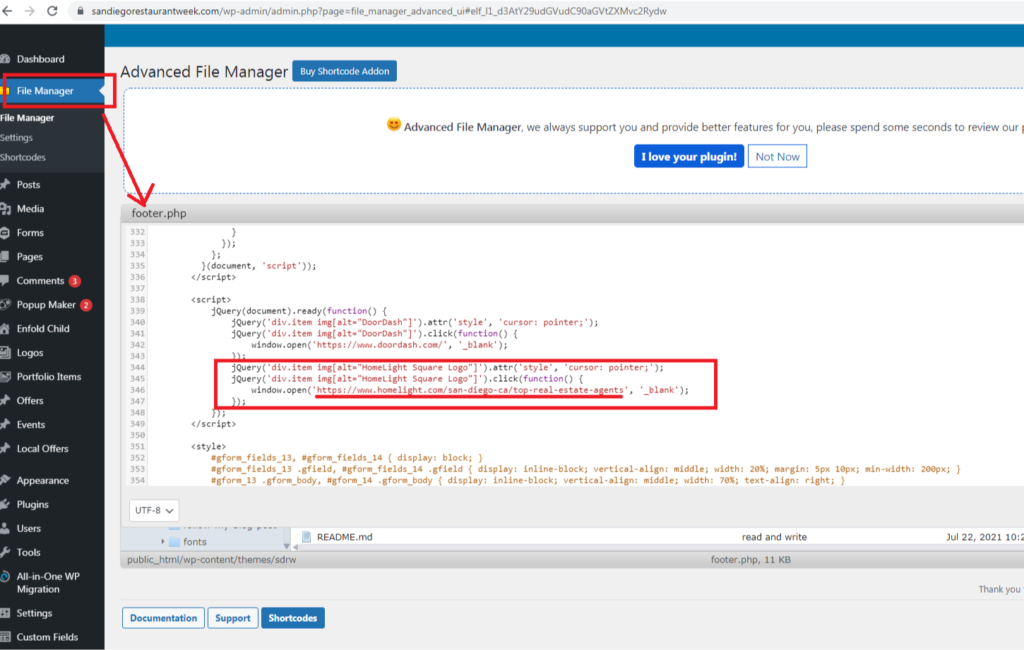
Ticket Reference: https://projects.publicadagency.com/desk/tickets/7241607/messages
Others
- Turn off anonymous comments
- Allow comments from logged in users
- Create a list of Blacklisted words start with this list
- Remove links from comments
- Install a spam plugin this is this one is highly recommended
- Close Comments on Older Posts
Reference: https://kinsta.com/blog/wordpress-spam-comments/
See video on how to force an SSL to a website.